Episode 4: “A Rocket Ship That You Control”
In the last episode we put a rocketship on the screen, now it's time to add controls to its. Because, of course, this is one of the most compelling promises made by Computer Space. Also, some refinements…
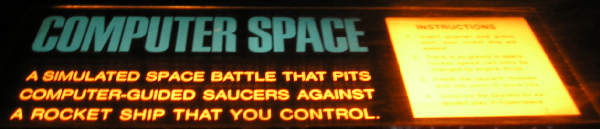
Computer Space attraction panel.
(Image: Computer Space Simulator by Mike "Moose" O'Malley.)
For a beginning, we tweak the outline of the rocket ship, we already have, just a little bit. Essentially, we move up the last three rows of dots up by a grid unit to make it a bit bulkier. Also, we adjust the scaling (sadly, it's not just a fraction of a power of 2 of the unit vector and we've to add some components). Same applies for the offset of the tip, providing the perceptual pivoting point of our ship. Finally, we increase the brightness level of the rocket display, mostly for a larger dot size.
With this in place, we turn to the graphics of the exhaust flames of our litlle spaceship.
Holy Smoke
The thrust animation in Computer Space consists of just two pixels drawn alternately at the stern of the ship. Should be easy to implement, shouldn't it? — Not so, as may be guessed by this introduction: At a closer inspection of footage of the game, we're thrown back into the Heisenberg uncertainty of Computer Space graphics, once again, as shapes vary with rotation. (We may call this the Bushnell-Dabney Uncertainty of electronically generated visuals.)
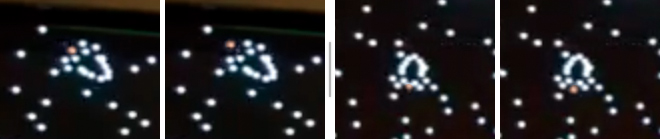
Computer Space: Visual representation of exhaust flames at two rotational angles.
(Colorization of exhausts for emphasis; N.L.)
As may be observed, the exhausts are much more accentuated at horizontal or diagonal rotational angles than in a close to vertical position of the ship, where they appear somewhat compressed and also closer to the vertical center of the rocket.
We settle for a compromise — and, of course, it's more on the prominent side, for effects. By this we arrive at the final form of our spaceship:
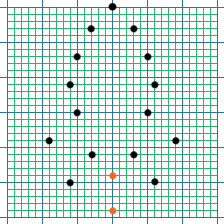
Ironic Computer Space Simulator: Final outline of the player's rocket ship.
Trusting Thrust
With the thrusting animation in place, we're ready to apply any player contolled dynamics to our little ship. As Computer Space has it's spaceship at a constant velocity, this is more or less about updating the values of delta x and delta y to a scaled amount of the unit vector (sine and cosine of the rotational angle) each time the player engages the thrust button. More or less — as there is more to this: Computer Space not only features a computer-like electronic device, but also a viscous space, where any newly applied dynamics just gradually come into effect.
We're facing two problems here: Constraining the velocity to a certain amount and implementing an accumulating acceleration. And, most important, we would like to avoid complex calculations, like square roots (as would be required for scaling a vector), for runtime's sake.
In order to do so, we come up with the following hack [ not by K.T. ;-) ]:
procedures:

1) scale the unit vector (sin for dx, cos for dy) to max velocity, store it.
2) scale this again for acceleration to be applied.
3) add old delta.
4) restrain the resulting components (for dx, dy) to the range of max velocity vector.
   (use the same method we've already used for the rotational angle.)
By this, we've arrived at a new value for dx (or dy, respectively) that we can trust to not to exceed the maximum velocity. And this by a few shifts and additions/subtractions only! What's still missing, is a proper viscosity:
(cont.)

5) average with old delta (dx, dy) for viscosity.
6) store results (to be added as constant delta to position later).
With this in place, we are ready to actually burn some fuel and maneuver the ship accross the screen. Thanks to the method descibed above we arrive at a quite pleasing experience that isn't far from the original behavior.
As a final improvement, we put the scalings for max velocity and for the rocket's acceleration in a parameters table on top of our code for the ease of any adjustments, following Steve Russell's best practice (who did similar in Spacewar! 3.1).
▶ Experience the code live: www.masswerk.at/icss/.
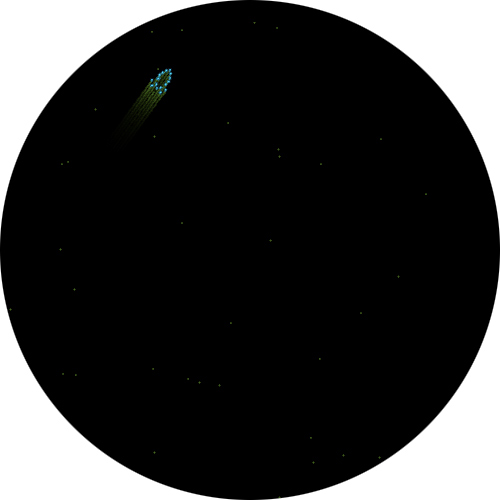
Thrusting rocket in ICSS v.0.04 (section of screenshot).
(www.masswerk.at/icss/)
The Dry Stuff — Implementation Details
Since the code has by now become a bit more complex, we wont go into verbose, descriptive details anymore, but rather refer any interested audiences to the comments in the code (see below).
However, it may be appropriate to introduce some more PDP-1 instructions for the benefit of the curious reader:
We're using a program flag (flag 5) to store, whether the ship is thrusting or not. (There are 6 program flags, 1–6, implemented in hardware. Flag 4 is also used for the console typewriter and we will avoid this one.) Instructions for setting and clearing flags are part of the operate group of instructions:
stf n  ... set flag n (1...6)
clf n  ... clear flag n (1...6)
The operate group includes instruction to change the internal state of the CPU and it's registers, like:
cla  ...... clear AC
cma  ...... complement AC
cli  ...... clear IO
lat  ...... load AC from testword switches
hlt  ...... halt
nop  ...... no operation
opr  ...... basic instruction code of operate group (syn. to nop)
Instructions of a group may be combined by microprogramming and will be executed in a single cycle. For this, we simply add the instruction codes (and substract the vale of the group, opr, since only the 12 lower bits are used for microprogramming. The micro-sequence in which the instructions occur are hardwired into the CPU. Some of these microprogrammed instructions also enjoy a well known mnemonic:
clc = cma+cla-opr  / clear AC and complement it (777777)

cla stf 5 .... clear AC and set flag 5 at once
Another group of microprogrammable instructions is the skip group, used to branch on conditions:
sma  ...... skip on minus AC (sign-bit set)
spa  ...... skip on plus AC
sza  ...... skip on zero AC
spi  ...... skip on plus IO
szf n  .... skip on flag n zero
szs n0 .... skip sense switch n zero (n: 1...6)
            e.g., "zss 10" to skip on sense switch 1 zero
Setting the i-bit inverts the condition:
sza i  .... skip on AC NOT zero
szf i n ... skip on flag n set (not zero)
Again, skip conditions may be combined by microprogramming to form a union. Here, instruction "szf" represents the basic instruction code of the group:
szm = sza sma-szf / skip on zero or minus AC
Having thus covered pretty much of the basic PDP-1 instructions, there are, we'll close our little PDP-1 101 for today.
And here's the code, so far:
ironic computer space  0.04  nl 2016-10-17

	mul=mus
	div=dis

define initialize A,B
	law B
	dap A
	term

define index A,B,C
	idx A
	sas B
	jmp C
	term

define swap
	rcl 9s
	rcl 9s
	term

define load A,B
	lio (B
	dio A
	term

define setup A,B
	law i B
	dac A
	term

define count A,B
	isp A
	jmp B
	term

/macros specific to the program

define scale A,B,C
	lac A
	sar B
	dac C
	term

define random
	lac ran
	rar 1s
	xor (355671
	add (355671
	dac ran
	term


/ Computer Space
/ Original arcade game by Nolan Bushnell and Ted Dabney,
/ Syzygy Engineering / Nutting Associates, 1971.
/"A simulated space battle that pits
/ computer-guided saucers against
/ a rocket ship that you control."


3/	jmp sbf			/ ignore seq. break
	jmp a0			/ start addr, use control boxes
	jmp a1			/ alt. start addr, use testword controls


/game parameters

raa,  6,	2700		/ rocket angular acceleration
rvm,  7,	sar 1s		/ scaling rocket max velocity
rva, 10,	sar 4s		/ scaling rocket acceleration
ran, 11,	0		/ random number


/routine to flush sequence breaks, if they occur.

sbf,	tyi
	lio 2
	lac 0
	lsm
	jmp i 1


/sine-cosine subroutine - Adams associates
/calling sequence= number in AC, jda sin or jdacos.
/argument is between +/- +2 pi, with binary point to right of bit 3.
/answer has binary point to right of bit 0.  Time = 2.35-? ms.
/changed for auto-multiply , ddp 1/19/63

cos,	0
	dap csx
	lac (62210
	add cos
	dac sin
	jmp .+4

sin,	0
	dap csx
	lac sin
	spa
si1,	add (311040
	sub (62210
	sma
	jmp si2
	add (62210

si3,	ral 2s
	mul (242763
	dac sin
	mul sin
	dac cos
	mul (756103
	add (121312
	mul cos
	add (532511
	mul cos
	add (144417
	mul sin
	scl 3s
	dac cos
	xor sin
	sma
	jmp csx-1
	lac (377777
	lio sin
	spi
	cma
	jmp csx

	lac cos
csx,	jmp .

si2,	cma
	add (62210
	sma
	jmp si3
	add (62210
	spa
	jmp .+3
	sub (62210
	jmp si3

	sub (62210
	jmp si1


/subroutines for background display

nos=77 	/number of stars

/table of stars coors (nos words, 9 bits x and 9 bits y)
bst,	. nos/

/setup (nos random coors starting at bst)

bsi,	dap bsx				/ deposit return address
	init bsc, bst			/ deposit first addr of bst in bsc
bsl,	random				/ get a new random number
bsc,	dac .				/ store it in current loc of st
	index bsc, (dac bst+nos, bsl	/ increment bsl, repeat at bgl for nos times
bsx,	jmp .				/ return


/display background stars (displays every 2nd frame only)

bg,	dap bgx				/ deposit return address
	isp bgc				/ increment bgc, skip on positive
bgx,	jmp .				/ return
	law i 2				/ load -2 into ac
	dac bgc				/ deposit in bgc to reset frame counter
	init bgl, bst			/ init bgl to first addr of stars table
bgl,	lac .				/ get coors of next star (x/y)
	cli				/ clear io
	scr 9s				/ shift low 9 bits in high 9 bits of io (x)
	sal 9s				/ move remaining 9 bits in ac in high part (y)
	add bgv				/ add vertical offset
	swap				/ swap contents of ac and io
	add bgh				/ add horizontal offset
	dpy-i				/ display a dot at coors in ac (x) and io (y)
	index bgl, (lac bst+nos, bgl	/ repeat the loop at bgl nos times
	jmp bgx				/ return

bgc,	0
bgh,	0
bgv,	0


/here from start

a0,	law rcb			/configure to read control boxes (sa 4)
	dap rcw
	jmp a2

a1,	law rtw			/configure to read testword (sa 5)
	dap rcw

/start a new run

a2,	jsp bsi			/ initial setup of bg-stars
	dzm bgh			/ reset offsets of stars to zero
	dzm bgv

/rocket reset

ar,	dzm \rth		/ rotational angle
	lac (-70000
	dac \rpx		/ pos x
	cla
	dac \rpy		/ pos y
	dzm \rdx
	dzm \rdy

/main loop

fr0,	load \ict, -4500	/ initial instruction budget (delay)

	jsp bg			/ display background
	jsp rkt			/ rocket routine

	count \ict, .		/ use up rest of time of main loop
	jmp fr0			/ next frame


/player rocket routine

rkt,	dap rkx
rcw,	jsp .			/read control word (ccw, cw, trust, fire)
	cla clf 5 -opr
	dio \cw			/merge (or) spacewar player inputs
	rcr 4s
	ior \cw
	dac \cw

	lio \cw			/parse and process rotation
	lac \rth		/load angle
	spi			/sign cleared in io?
	add raa			/no, add angular acceleration
	ril 1s			/next bit
	spi
	sub raa
	sma			/normalize 0 >= angle >= 2Pi (311040)
	sub (311040
	spa
	add (311040
	dac \rth		/update angle

	ril 1s			/parse thrust input
	spi
	stf 5			/set flag 5 for thrust
	jda sin			/get sin, store it in \sn
	dac \sn
	lac \rth
	jda cos			/get cos, store it in \cs
	dac \cs

	szf i 5			/flag 5 set? update dx / dy
	jmp rp0
	lac \sn			/dx
	cma
	sar 7s
	xct rvm			/apply scaling for max velocity
	dac \t1
	xct rva			/apply scaling for acceleration
	add \rdx		/add old dx
	spa			/is it positive?
	jmp . 6			/no, skip next 5 instr.
	sub \t1			/constrain positive vel.
	sma
	cla
	add \t1
	jmp . 5
	sub \t1			/constrain negative vel.
	spa
	cla
	add \t1
	add \rdx		/average with old dx for viscosity
	sar 1s
	dac \rdx		/store updated dx
	lac \cs			/same for dy
	sar 7s
	xct rvm
	dac \t1
	xct rva
	add \rdy
	spa
	jmp . 6
	sub \t1
	sma
	cla
	add \t1
	jmp . 5
	sub \t1
	spa
	cla
	add \t1
	add \rdy
	sar 1s
	add \rdy

rp0,	scale \sn, 4s, \sn1	/get position of rocket tip
	sar 4s			/offset x = (sin >> 4) - (sin >> 8)
	cma
	add \sn1
	dac \sn1
	scale \cs, 4s, \cn1	/offset y = (cos >> 4) - (cos >> 8)
	sar 4s
	cma
	add \cn1
	dac \cn1
	lac \rpx		/update pos x (add dx)
	add \rdx
	dac \rpx
	sub \sn1		/subtract offset for tip, store it in \px
	dac \px
	lac \rpy		/same for y
	add \rdy
	dac \rpy
	add \cn1
	dac \py

	scale \sn, 7s, \sn4	/scaled sine 4 steps
	sar 1s
	add \sn4
	dac \sn4		/sn4 = (sin >> 7) + (sin >> 8)
	dac \sm4		/sm4 for lateral offsets (will be complemented)
	sar 1s
	dac \sn2		/scaled sine 2 steps
	dac \sm2
	sar 1s			/scaled sine single step
	dac \sn1
	dac \sm1
	scale \cs, 7s, \cn4	/same for cosine
	sar 1s
	add \cn4
	dac \cn4
	dac \cm4
	sar 1s
	dac \cn2
	dac \cm2
	sar 1s
	dac \cn1
	dac \cm1

	jsp rod			/display it

	lac \ict		/update instruction count
	add (1000
	dac \ict

rkx,	jmp .


/control word get routines

/read control boxes
rcb,	dap rcx
	cli
	iot 11
rcx,	jmp .

/read testword
rtw,	dap rtx
	lat
	swap
rtx,	jmp .


/rocket display
/ step rearwards -  x add \sn1, y sub \cn1
/ step outwards  -  x add \cm1, y add \sm1
/ step inwards   -  x sub \cm1, y sub \sm1

define disp
	dpy-i 100		/display a dot at brightness level +1
	term

rod, 	dap rox
	stf 6			/set flag 6
	lac \px
	lio \py
	disp

rop,	swap			/y +3, x +3
	sub \cn2
	sub \cn1
	add \sm2
	add \sm1
	swap
	add \sn2
	add \sn1
	add \cm2
	add \cm1
	disp

	swap			/y +4, x +2
	sub \cn4
	add \sm2
	swap
	add \sn4
	add \cm2
	disp

	swap			/y +4, x +1
	sub \cn4
	add \sm1
	swap
	add \sn4
	add \cm1
	disp

	swap			/y +4, x -1
	sub \cn4
	sub \sm1
	swap
	add \sn4
	sub \cm1
	disp

	swap			/y +5, x +4
	sub \cn4
	sub \cn1
	add \sm4
	swap
	add \sn4
	add \sn1
	add \cm4
	disp

	swap			/y +1, x -6
	sub \cn1
	sub \sm4
	sub \sm2
	swap
	add \sn1
	sub \cm4
	sub \cm2
	disp

	swap			/y +4, x +3
	sub \cn4
	add \sm2
	add \sm1
	swap
	add \sn4
	add \cm2
	add \cm1
	disp

	szf i 6			/flag 6 set? (skip on not zero)
	jmp rot
	clf 6			/clear flag 6
	lac \cm1		/invert unit vector components
	cma
	dac \cm1
	lac \sm1
	cma
	dac \sm1
	lac \cm2
	cma
	dac \cm2
	lac \sm2
	cma
	dac \sm2
	lac \cm4
	cma
	dac \cm4
	lac \sm4
	cma
	dac \sm4
	lac \px			/load first pos
	lio \py
	jmp rop			/second pass for other side

rot,	szf i 5			/no, flag 5 set?
rox,	jmp .			/no, return
	swap			/draw exhaust flame
	sub \sm4		/x -6
	sub \sm2
	swap
	sub \cm4
	sub \cm2
	dac \px			/store position
	dio \py
	idx \rtc		/increment a counter and check second least bit
	and (2
	sza			/is it zero? (state switch)
	jmp ro2
ro1,	lac \py			/state 1, display at y-1
	add \cn1
	swap
	lac \px
	sub \sn1
	disp
	jmp rox
ro2,	lac \py			/state 2, display at y+4
	sub \cn4
	swap
	lac \px
	add \sn4
	disp
	jmp rox			/jump to return

	constants
	variables

	start 4
That's all for this post.
▶ Next: Episode 5: Yet Another Progress Update
◀ Previous: Episode 3: Rocketry — Or, Fly Me to the Moon Stars
▲ Back to the index.
2016-10-17, Vienna, Austria
www.masswerk.at – contact me.
— This series is part of Retrochallenge 2016/10. —