Please, Just Stop Ruining "10 PRINT". Seriously.
The sad story of an adorable little program and its looming demise.
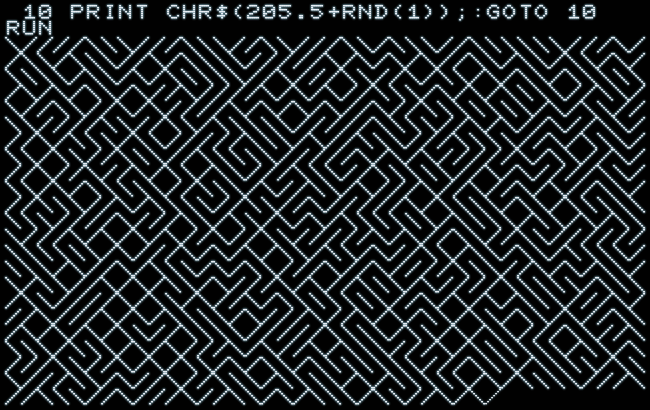
Lately, we’ve seen a number of disturbing variants of the famous “10 PRINT” program for Commodore BASIC (and, with a slight modification, for any machine running BASIC). These are all about “speed”, i.e. runtime performance, but, as we’re going to argue, they are all missing the point. Even worse, they are apt to ruin it. Entirely.
It all started with a video by David Murray (“The 8-Bit Guy”), followed by a response by Robin Harbron (“8-Bit Show And Tell”), and now we even see videos implementing similar complex algorithms in assembler, and I’m rather confident that we will see more of this (including some “A.I.”-generated abominations) as others will pick up the baton to join the “race”. Granted, Robin‘s reply already contained some of the criticism we’re going to express here, and probably attempetd more along those lines, but, for the most, this fell victim to an attempted shortness of a response video. (Runtime, again…)
10 PRINT
“10 PRINT” is a famous little program. It‘s a showpiece of emergence, giving rise to an image of astounding complexity, even beauty, from utter simplicity. Entire books have been written about it.
The “10 PRINT” program was first introduced to a wider public in the “Personal Computing On The VIC-20” guide (Commodore, 1982), the user manual for the VIC-20, where it appeared in three-line form (including an initial PRINT statement for clearing the screen) under the name “Random Maze” (Program 6) on page 102 of the guide.
“This is a neat little program that prints pseudo-mazes all over the screen.” (Commodore, 1982)
Subsequently, it has become better known in the form of a BASIC one-liner:
10 PRINT CHR$(205.5+RND(1));:GOTO 10
We can immediately grasp that there isn’t much in this program. No hidden knowledge about the architecture, the memory map, any digital components, etc. It’s just a simple PRINT statement at its core, printing a single character to the screen, over and over. And as this sequential output eventually wraps and folds over at the end of the display line, it gives rise to a pattern much more complex than itself. We can immediately and intuitively see that there is no secret encoded, no greater knowledge hidden in this program (as opposed, say, in the case of an LLM), just a PRINT and a GOTO to form an infinite loop.
It will run on any computer with 8-bit Commodore BASIC (or compatible, likie AppleSoft BASIC), regardless of screen dimensions or configuration (i.e., on a PET with 40 characters per line, a PET with 80 characters a line, the VIC-20 with its 22-character screen lines, a C64, a C128, not to miss the C16, the C116 or the Plus/4, even on printer output with the line width set to any random number). It uses 26 bytes memory (or, here, with two additional blanks for readability: 28) and requires no additional memory for variables or on the string stack.
There isn’t much to it, really. It’s easy to memorize, and, once we have understood it, all we really have to keep in mind is the constant 205.5 in order to type it in and to admire its output.
So, let’s go quickly over this:
10
The name-giving line number. :-)
PRINT …;
Outputs a string or number onto the screen or the configured output device (like a printer).
The trailing semicolon (;) causes the next PRINT command to append its output immediately adjacent to this. (‘PRINT "A";:PRINT "B"’ gives the same output as ‘PRINT "AB"’, as does ’PRINT "A";"B"’.)
CHR$(…)
BASIC function to convert a given numerical value to the PETSCII character with the respective order number. Since its parameter is really a byte value, it implicitly converts any floating point numbers to integer (i.e., truncating it to the next lower integer by dropping the fractional part.)
RND(1)
BASIC function to call a random number between zero and one ( 0 > n > 1 ).
The parameter, an integer, does matter:
| +n | If the argument is greater than zero, this returns the next random number in sequence. ‘ RND(1)’, as used here, is kind of the default random expression. |
| -n | If the argument is less than zero, the function returns the nth number from the start of the sequence. The function returns the same result on subsequent calls. Useful for initializing the random seed for reproducible results. |
| 0 | If the argument is zero, the seed will be initialized from the internal timers. While this makes for a good initialization, it provides a poor random sequence if called consecutively. |
Note: Some versions of BASIC, other than Microsoft or Commodore BASIC, may return an integer from 0 to up to the upper boundary given as the argument. ‘RND(1)’, should be fine for these, as well.
205.5
This is the tricky part: if there is a sleight of hand, it’s this. We want to ouput either the upward or downward sloped diagnal graphics character, ╱ and ╲. In PETSCII, these are adjacent characters:
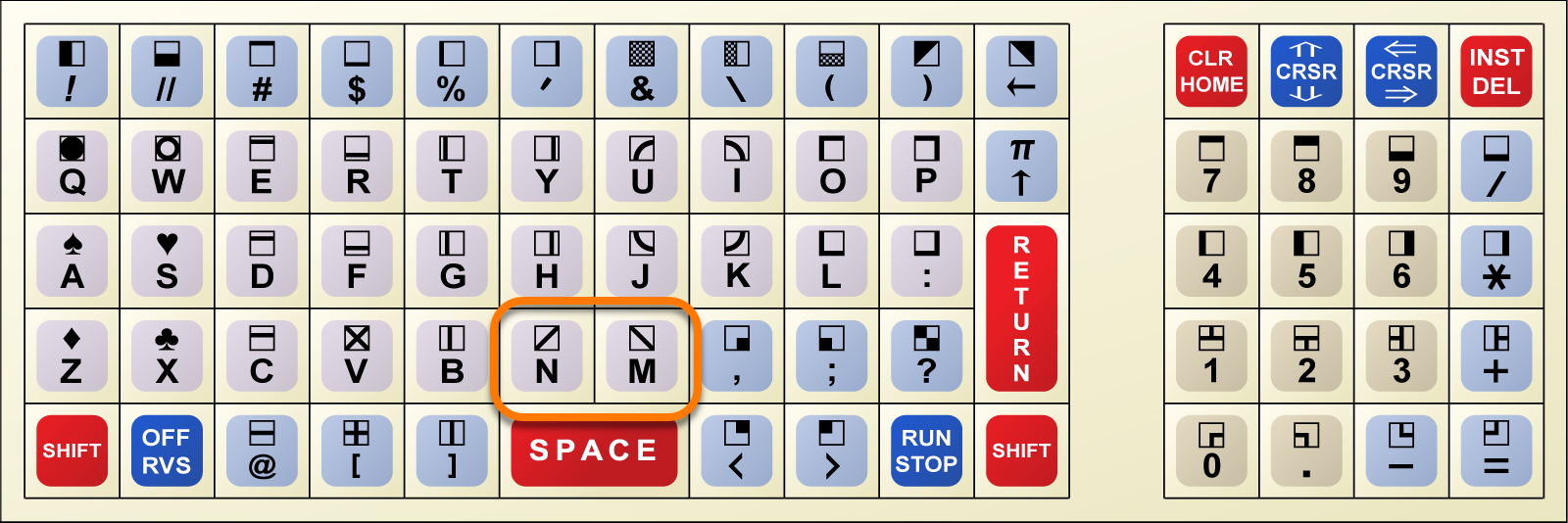
The order number is the one of the unshifed main character on the keyboard plus 128 (a set sign-bit) for its shifted variant, thus #‘M’+128 and #‘N’+128, respectively. Since “M” and “N” are adjacent letters in the Latin alphabet, they have adjacent PETSCII codes, as do our two diagonals. Namely, #205 and #206.
The C64 is somewhat handicapped by its bold font, since the ends of the thick, double-pixel-wide strokes of its diagonal characters won’t line up seamlessly, resulting in a less than perfect image.
The trick is here that the function CHR$() implicitly converts the argument to an integer character index. Thus, the result of the expression
205.5+RND(1)
will be in the range 205.5 + (0.000…1 … 0.999…), providing the following alternative:
- if the value returned by
RND(1)is less than0.5, the result falls down the “integer cliff” to205
(CHR$(205): ╲) - if the value returned by
RND(1)is greater than or equal0.5, the result is truncated to206
(CHR$(206): ╱).
Thus, “CHR$(205.5+RND(1))” will produce either of the two single-character strings “╲” or “╱”.
Continuing with our one-liner:
:
Statement separator. Not much to see here.
GOTO 10
Jumps to the start of this very line, by this forming an infinite loop to PRINT either of our two random characters, over and over. (Stop by hitting the RUN/STOP key. But why would you want to do this?)
That’s it. All kind of spaces/blanks may be added or omitted for more or less readability.
In memory, our program looks like this (on a PET with a start address of $0401, on a C64, this will be $0801), here with two blanks for 28 bytes in total:
addr.       bytes         comment

0401  1B 04               link/pointer to next line: $041B
0403  0A 00               line number (16-bit binary): 10
0405  99                  token PRINT
0406  20                  ascii « »
0407  C7                  token CHR$
0408  28 32 30 35 2E 35   ascii «(205.5»
040E  AA                  token +
040F  BB                  token RND
0410  28 31 29 29 3B 3A   ascii «(1));:»
0416  89                  token GOTO
0417  20 31 30            ascii « 10»
041A  00                  -EOL-
041B  00 00               -EOF- (link = null)
ASCII-Compatibile “10 PRINT”
In order to make this truly universal, to make this run on any ASCII-based computers (like CP/M machines running M-BASIC or BASIC80) lacking the special graphics characters (or having them at different order numbers), we’d take the ASCII code of the forward slash (0x2F or decimal 47) and the ASCII code of the backslash (0x5C or 92) and add the offset for the larger order number randomly to the smaller value, as in “BASE_VALUE + INT(0.5+RND(1))*OFFSET”:
10 PRINT CHR$(47+INT(0.5+RND(1))*45);:GOTO 10
Since the expression “INT(0.5+RND(1))” will yield either 0 or 1, this results in PRINTing either “CHR$(47)” or “CHR$(92)”, our two slash characters.
The resulting output may be somewhat less pretty, but is still structurally similar, as seen here on an emulated PET:
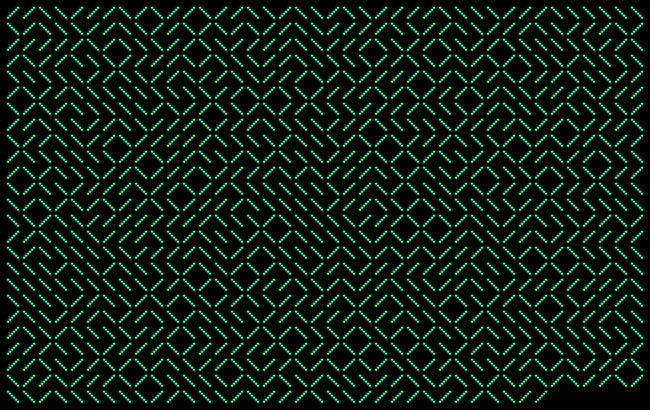
Note: This won’t show as expected on a VIC-20 or C64 and so on, since these replaced the backslash character by the Pound Sterling sign, “£”.
And now for…
The Rant
As we have seen, the fascination with “10 PRINT” is grounded in a joyful ratio of structural simplicity to output complexety. In it’s simplicity and shortness it is easy to memorize (we really have to remember just “205.5”), easy and quick to type in, run, and to demonstrate, over and over again. And it’s easy to grasp, as it wraps in a tight GOTO loop around a single PRINT statement. There isn’t much to hide in such a short and elementary program. It doesn‘t require much resources, it‘s mostly agnostic of the architecture it runs on, and will output to any device which wraps a linear output. It never disappoints as we watch a complex picture emerging from the simple serial output of a binary alternative, a character at a time. It’s about the most basic program, there is, and, because of this, also one of the most surprising.
I’d argue, anything that doesn’t output charcter by character in real-time, uses lookup tables and/or special hardware (like PEEKing C64 SID values) isn’t “10 PRINT”, at all.
Now have a look at those “optimizations”: They span over tens, if not hundreds of lines, reading lists of complex strings from DATA statements or building equivalent tables in memory by complex algorithms. This not only comes at a considerable cost in terms of start-up time (in the case of David Murray’s example an impressive 40+ seconds), it’s also a reversal of our delightful simplicity to complexity ratio. Not only are these programs too long and complex to memorize and too complex to grasp intuitively, the internal complexity is probably higher than the complexity of the output. — Nothing to see, no emergence, carry on.
Moreover, as the internal complexity increases, these programs become more and more dependent on the platform, they run on, and on the intricacies of the BASIC dialect in use. The amount of knowledge encoded in those programs and conversely required to decode them becomes considerable.
And what’s worse: the output generated dosen’t even look the part.
Pseudo-Randomness
There’s a conceptual failure involved in this: by outputing partial or entire screen lines, as selected from lookup tables at random, at once, a homogenous screen line consisting of just a single character has an about equal chance of showing up than any other possible combination.
But this is not how RND() works.
Random functions, like RND(), are geared towards distribution. Their algrorithms have been chosen for a variety of output, for use in games and the like, and are expected to distribute evenly to above and below 0.5 in comparitively short runs of consecuitive calls. Thus, the chance of a 40-characters screen line consisting of just the same character should be pretty close to nil.
We can visualize this by a short program plotting the distribution:
10 PRINT SPC(RND(1)*38)"*":GOTO 10

Values close to zero on the left, values close to 1 at the right, 0.5 in the middle.
We can even put our intuition to a test, measuring the length of runs of the values returned by consecutive calls to RND(1) as they fall below or above 0.5:
5 REM SERIES OF RND() LT/GTE 0.5
10 R=0:S=0:N=1:M=0
20 PRINT "{CLEAR} N","MAX":PRINT
30 R=INT(RND(1)+0.5)
40 IF R=S THEN N=N+1:GOTO 30
50 PRINT N,M
60 IF N>M THEN M=N
70 S=R:N=1:GOTO 30
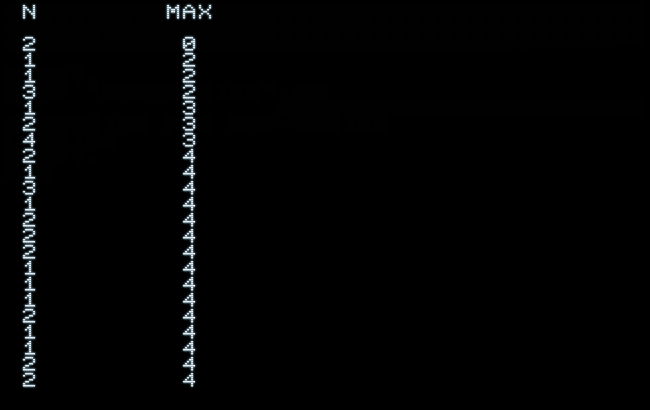
This yields an output like this:
 N        MAX

 2         0
 1         2
 1         2
 3         2
 1         3
 2         3
 4         3
 2         4
 1         4
 3         4
 1         4
 2         4
 2         4
 2         4
 1         4
 1         4
 1         4

     (…)

 1         13
 2         13
 1         13
 4         13
 1         13
 2         13
 1         13
 1         13
 2         13
 2         13
 1         13
 6         13
 3         13
 2         13
 2         13
 1         13

     (…)
Letting this run for quite a while, the longest observed run of values either all above or all below 0.5 was just 13, about a third of a 40-characters line, and even this was a rare occasion.
At this point, we may pretty safely assume that the better part of the possible binary combinations of a 40-character line won’t show up, at all. This is, because the expectation guiding the selection of the algorithm includes context. These are not isolated results, they stand in the context of a limited series of calls. (Which is also why we can’t or shouldn’t use such functions for things like cryptography.)
And it’s exactly this “lively”, varying distribution around 0.5 over rather limited periods that we see in the output of the original program. This is not a purely stochastic distribution and it is not made of independent events. Probability in terms of bare combinatorics does not apply here.
As a consequence, the output of these programs based on lookup tables and stochastic selection from lists of complex building blocks has a more “mechanical” feel, a less “organic” look, lacking the “organized variety” of the original.
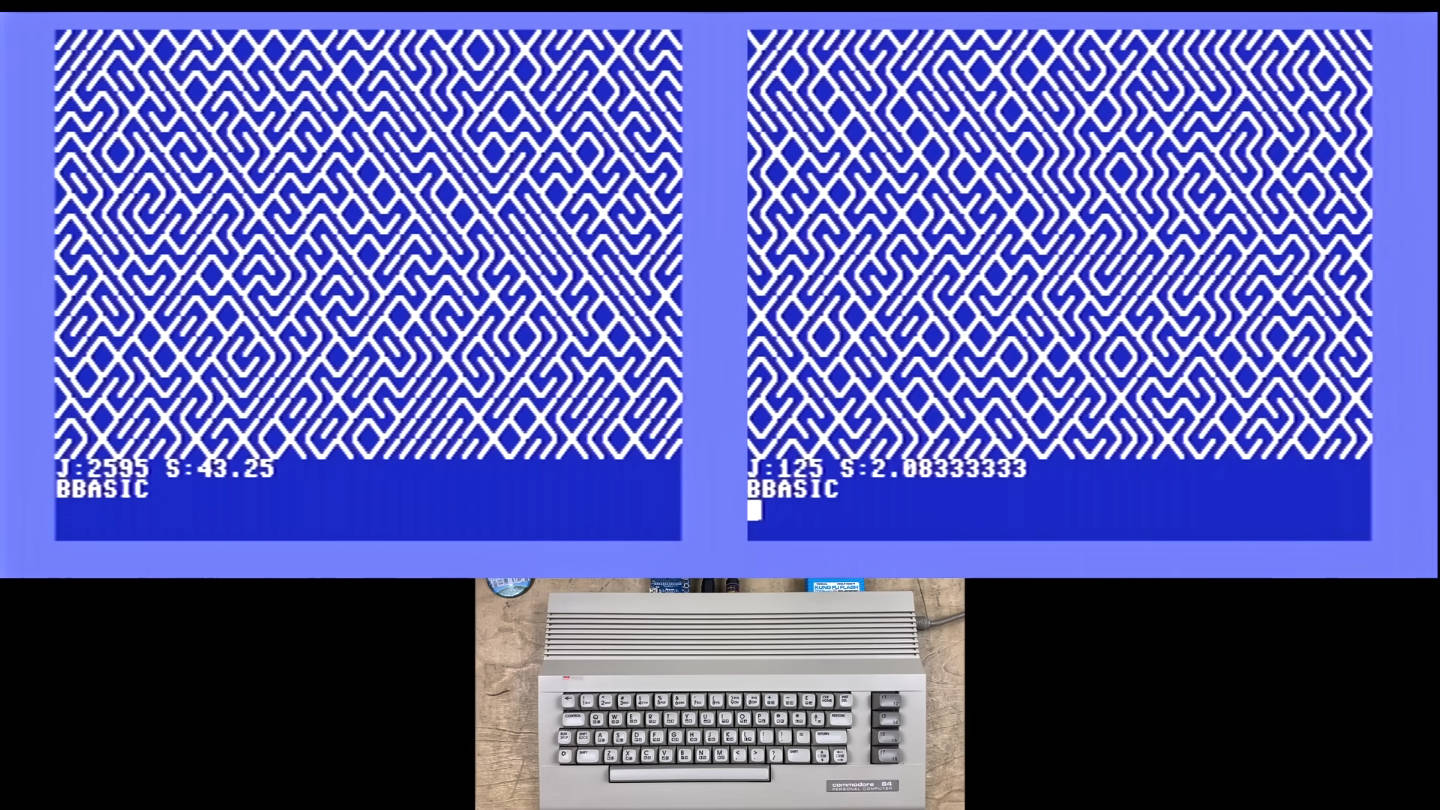
David Murray’s program to the left, Robin’s program to the right.
For comparison, the more vivid output of the original program (same screenshot as above):
Or, if you prefer the C64 font for a closer comparison:
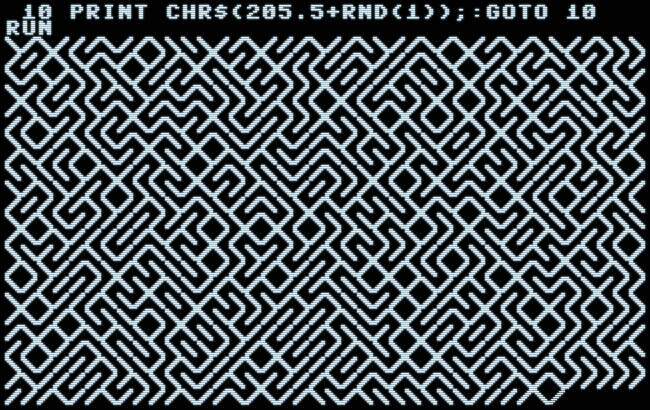
To illustrate the problem, we may find that the output of the original program should make a great design for fabrics. But, if we ordered this and got the output of any of these “optimized” versions instead, we may think that something must have gone wrong in the manufacturing process. This is not what we were looking for, and it”s not what attracted us in the first place. Based on our expectation and what we saw in the sample, this is disappointing. Chances are, we’d reject the item as delivered and send it back to the vendor.
A Serious Plea
In conclusion, we may ascertain that this new generation of “optimized” 10 PRINT fails in about every category which makes the program worthwhile or remarkable, apart from the execution speed of the main loop of their display algorithm. In other words, they are missing the point entirely.
So, please, just stop! No more of this. Seriously.
You’re ruining it.
— Thank you for yor attention to this matter. —

Norbert Landsteiner,
Vienna, 2026-05-28